
Beginner
Illustrated guide: LEDs, buttons, sensors and motors, with wiring diagrams and commented code.
Price on request
Request this product
Written for practice: every chapter ends with a build that works. PDF format, instant download.
Illustrated guide: LEDs, buttons, sensors and motors, with wiring diagrams and commented code.
Web server, remote sensors and phone alerts with an ESP32 board.
Automate a home or a small shop: relays, timers, presence sensors.
Learn programming logic by building small, useful tools.
From chassis to code: a robot that avoids obstacles and follows a line.
Use artificial intelligence in your small business, without being a programmer.
Preview: 5 pages from the book.
1No need to know electronics. Each build starts with a photo of the parts, continues with the wiring diagram and ends with the code, commented line by line. First you get it working; then you understand why.
2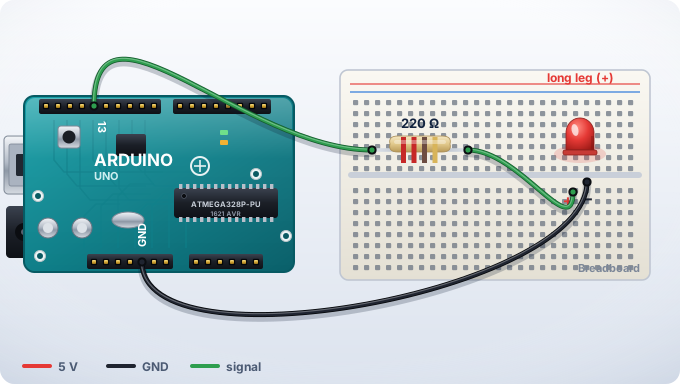
void setup() {
  pinMode(13, OUTPUT);
}

void loop() {
  digitalWrite(13, HIGH);
  delay(500);
  digitalWrite(13, LOW);
  delay(500);
}
4
Make the LED flash the SOS pattern: three short blinks, three long, three short.
In the book: the step-by-step solution, with the diagram and full code.
5Liked the excerpt? The full book is a PDF with all the builds.
Price on request Request this productPreview: 5 pages from the book.
1The ESP32 is inexpensive and has WiFi and Bluetooth built in. In this book, you use it as the brain of projects you can control from your phone, with no paid cloud and no long wires.
2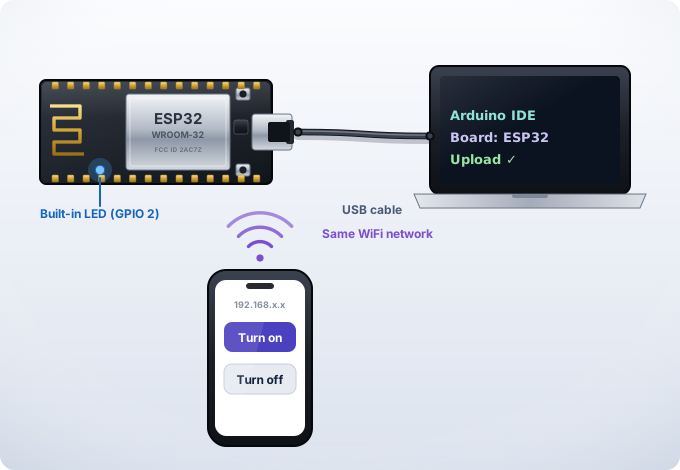
#include <WiFi.h>

void setup() {
  Serial.begin(115200);
  WiFi.begin("TU_WIFI", "TU_CLAVE");
  while (WiFi.status() != WL_CONNECTED)
    delay(300);
  Serial.println(WiFi.localIP());
}

void loop() {}
4
Display the WiFi signal strength (WiFi.RSSI()) in the serial monitor every second.
In the book: the step-by-step solution, with the diagram and full code.
5Liked the excerpt? The full book is a PDF with all the builds.
Price on request Request this productPreview: 5 pages from the book.
1Automating means telling your home what to do when something happens. You start with low voltage (12 V), safe for learning, and finish with a complete system to install with an electrician.
2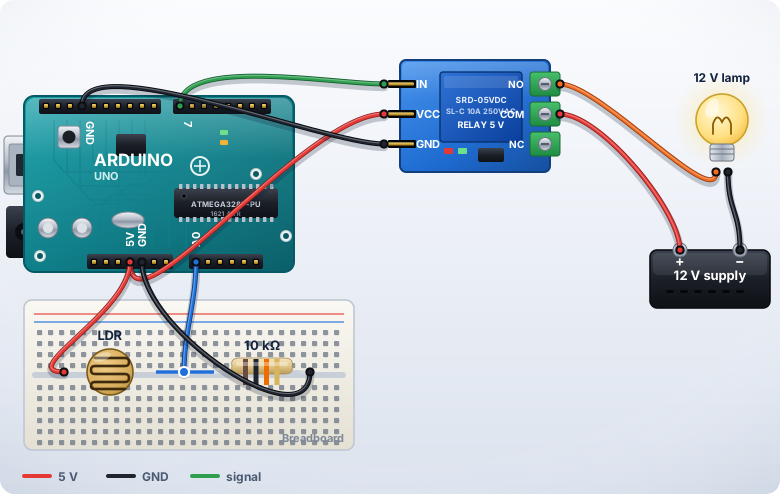
int luz = analogRead(A0);

if (luz < 400) {
  digitalWrite(7, LOW);   // enciende
} else {
  digitalWrite(7, HIGH);  // apaga
}
4
Add a second threshold so the light doesn't flicker when a cloud passes by (hysteresis).
In the book: the step-by-step solution, with the diagram and full code.
5Liked the excerpt? The full book is a PDF with all the builds.
Price on request Request this productPreview: 5 pages from the book.
1Programming means giving clear instructions. You learn the logic with Python and small projects: a price calculator, a sales log, a file reader. No unnecessary theory.
2nombre = input("Nombre: ")
for i in range(3):
print("Hola", nombre)
precio = 12500
print("IVA 19%:", precio * 0.19)
4
Modify the program so it asks for the price and calculates the total with VAT.
In the book: the step-by-step solution, with the diagram and full code.
5Liked the excerpt? The full book is a PDF with all the builds.
Price on request Request this productPreview: 5 pages from the book.
1A robot is a cycle: sense, decide, act. You assemble the chassis, give it eyes (a distance sensor) and teach it to decide. By the end, your robot avoids obstacles on its own.
2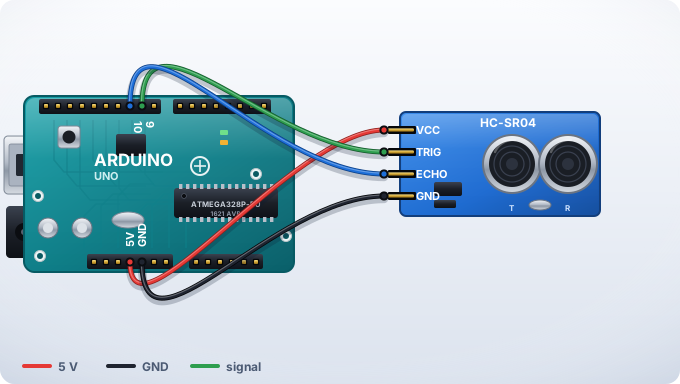
if (distancia < 20) {
  detener();
  girar();
} else {
  avanzar();
}
4
Always make the robot turn toward the clearer side (measure left and right).
In the book: the step-by-step solution, with the diagram and full code.
5Liked the excerpt? The full book is a PDF with all the builds.
Price on request Request this productPreview: 5 pages from the book.
1No programming needed. You learn to ask AI for what you need with clear prompts, to check its answers and to turn repetitive tasks (quotes, replies, summaries) into a five-minute process.
2Act as a sales advisor for a shop. Write a friendly 3-line reply to a customer asking about the price and the delivery time. Use a warm, informal tone.4
Write your own prompt to reply to the message you receive most often in your business.
In the book: the step-by-step solution, with the diagram and full code.
5Liked the excerpt? The full book is a PDF with all the builds.
Price on request Request this productAll 6 digital books together, with future updates.
Step-by-step video course, with the code for each lesson.
Commented code, parts list and wiring diagram for every project.
Discover the kits we recommend for each book.